Showing posts with label 10/11 SEM 1 BCS2234. Show all posts

11/02/2010

BCS2234 Java Applet Lab Activities 3/11/2010

1. New power point slide for Java applet. Click here.

2. Exercise

Write an applet that writes your name using the drawString method. Embed a link to your applet in an HTML document and view it using a Web browser.

References / tutorials

1. visual and interactive aspects of applets

2. Complete references for

java.awt
Class Graphics


10/29/2010

Tugasan 3 BCS2234 OOP

Tugasan BCS2234 boleh di muat turun daripada pautan berikut.
Tarikh hantar 11/11/2010 (Khamis).

10/26/2010

Exception 27 /10 /2010

Write a program that creates an input dialog box to perform integer divisions, as shown in following figure. The user enters two numbers in the text fields, Number 1 and Number 2. The division of Number 1 and Number 2 is displayed in the Result field (Figure 1).


[FIGURE 1]


Add an exception to handle invalid input as shown in Figure 2.


[FIGURE 2]


10/19/2010

BCS2234 Inheritance (2)


Pada Slide No 4 Chapter9 pelajar telah di beri contoh cara mengistharkan Superclasses dan subclasses. 4 class telah di istiharkan iaitu GeometricObject, Circle, Rectangle dan TestCircleRectangle (sila rujuk gambar di sebelah). Contoh tersebut menggunakan package (iaitu setiap satu class di di tulis dalam fail berasingan. Jika pelajar ingin mengumpulkan semua kelas dalam satu fail - Langkah yang perlu di buat ialah dengan membuang perkataan public pada setiap class yang dibina. Sila lihat contoh dibawah:-


/**
* @(#)Perwarisan.java
*
* Perwarisan application
*
* @author
* @version 1.00 2010/10/20
*/

public class Perwarisan {

public static void main(String[] args) {

// TODO, add your application code
System.out.println("Hello World!");
Circle circle = new Circle(1);
System.out.println("A circle " + circle.toString());
System.out.println(circle.getRadius());
System.out.println("The radius is " + circle.getRadius());
System.out.println("The area is " + circle.getArea());
System.out.println("The diameter is " + circle.getDiameter());

}
}


class GeometricObject { // perkataan public telah di buang
private String color = "white";
private boolean filled;
private java.util.Date dateCreated;

/** Construct a default geometric object */
public GeometricObject() {
dateCreated = new java.util.Date();
}

/** Return color */
public String getColor() {
return color;
}

/** Set a new color */
public void setColor(String color) {
this.color = color;
}

/** Return filled. Since filled is boolean,
so, the get method name is isFilled */
public boolean isFilled() {
return filled;
}

/** Set a new filled */
public void setFilled(boolean filled) {
this.filled = filled;
}

/** Get dateCreated */
public java.util.Date getDateCreated() {
return dateCreated;
}

/** Return a string representation of this object */
public String toString() {
return "created on " + dateCreated + "\ncolor: " + color +
" and filled: " + filled;
}
}

class Circle extends GeometricObject { // perkataan public telah di buang
private double radius;

public Circle() {
}

public Circle(double radius) {
this.radius = radius;
}

/** Return radius */
public double getRadius() {
return radius;
}

/** Set a new radius */
public void setRadius(double radius) {
this.radius = radius;
}

/** Return area */
public double getArea() {
return radius * radius * Math.PI;
}

/** Return diameter */
public double getDiameter() {
return 2 * radius;
}

/** Return perimeter */
public double getPerimeter() {
return 2 * radius * Math.PI;
}

/** Print the circle info */
public void printCircle() {
System.out.println("The circle is created " + getDateCreated() +
" and the radius is " + radius);
}
}

10/13/2010

BCS2234 13/10/ 2010 Inheritance

Programming Exercises

Sections 9.2–9.4

9.1 (The Triangle class) Design a class named Triangle that extends GeometricObject. The class contains:
  • Three double data fields named side1, side2, and side3 with default values 1.0 to denote three sides of the triangle.

  • A no-arg constructor that creates a default triangle.

  • A constructor that creates a rectangle with the specified side1, side2, and side3.

  • The accessor methods for all three data fields.

  • A method named getArea() that returns the area of this triangle.

  • A method named getPerimeter() that returns the perimeter of this triangle.

  • A method named toString() that returns a string description for the triangle.

For the formula to compute the area of a triangle, see Exercise 5.19. The toString() method is implemented as follows:

return "Triangle: side1 = " + side1 + " side2 = " + side2 +   " side3 = " + side3; 

Draw the UML diagram that involves the classes Triangle and GeometricObject. Implement the class. Write a test program that creates a Triangle object with sides 1, 1.5, 1, sets color yellow and filled true, and displays the area, perimeter, color, and whether filled or not.


Running a Java Program from Command Prompt

  • Create a temporary folder C:\mywork. Using Notepad or another text editor, create a small Java file HelloWorld.java with the following text:
    public class HelloWorld {   public static void main(String[] args)   {     System.out.println("Hello, World!");   } }

    Save your file as HelloWorld.java in C:\mywork. To make sure your file name is HeloWorld.java, (not HelloWorld.java.txt), first choose "Save as file type:" All files, then type in the file name HelloWorld.java.

  • Run Command Prompt (found under All Programs/Accessories in the Start menu). Type
    C:\> cd \mywork
    This makes C:\mywork the current directory.
    C:\mywork> dir
    This displays the directory contents. You should see HelloWorld.java among the files.
    C:\mywork> set path=%path%;C:\Program Files\Java\jdk1.6.0_21\bin
    This tells the system where to find JDK programs.
    C:\mywork> javac HelloWorld.java
    This runs javac.exe, the compiler. You should see nothing but the next system prompt...
    C:\mywork> dir
    javac has created the HelloWorld.class file. You should see HelloWorld.java and HelloWorld.class among the files.
    C:\mywork> java HelloWorld
    This runs the Java interpreter. You should see the program output:
    Hello, World!

    If the system cannot find javac, check the set path command. If javac runs but you get errors, check your Java text. If the program compiles but you get an exception, check the spelling and capitalization in the file name and the class name and the java HelloWorld command. Java is case-sensitive!

10/12/2010

BCS2234 13/10/ 2010 String Class


Section 8 The String Class
8.1
Suppose that s1, s2, s3, and s4 are four strings, given as follows:
String s1 = "Welcome to Java";
String s2 = s1;
String s3 = new String("Welcome to Java");
String s4 = s3.intern();
What are the results of the following expressions?
(1)A s1 == s2
(2) s1 == s3
(3)A s1.equals(s2)
(4) s2.equals(s3)
(5) s1.compareTo(s2) (15) s1.substring(5, 11)
(6) s2.compareTo(s3) (16) s1.startsWith("Wel")
(7) s1 == s4 (17) s1.endsWith("Java")
(8) s1.charAt(0) (18) s1.toLowerCase()
(9)A s1.indexOf('j') (19) s1.toUpperCase()
(10) s1.indexOf("to") (20) " Welcome ".trim()
(11) s1.lastIndexOf('a') (21) A s1.replace('o', 'T')
(12) s1.lastIndexOf("o", 15) (22) s1.replaceAll("o", "T")
(13) s1.length() (23) s1.replaceFirst("o", "T")
(14)A s1.substring(5) (24) s1.toCharArray()
8.4
(Occurrences of a specified character) Write a method that finds the number of occurrences of a specified character in the string using the following header:
public static int count(String str, char a)
For example, count("Welcome", 'e') returns 2.
8.6
(Counting the letters in a string) Write a method that counts the number of letters in the string using the following header:
public static int countLetters(String s)
Write a main method to invoke countLetters("Java in 2008") and display its return value.
8.8
(Binary to decimal) Write a method that parses a binary number as a string into a decimal integer. The method header is as follows:
public static int parseBinary(String binaryString)
For example, binaryString 10001 is 17 (1 x 24 + 0 x 23 + 0 x 22 + 0 x 2 + 1 = 17) So, parseBinary("10001") returns 17. Use binary string 11111111 to test the method. Note that Integer.parseInt("10001", 2) parses a binary string to a decimal value. Do not use this method in this exercise.
Solutions
8.1 (1) True
8.1 (3) True
8.1 (9) -1
8.1 (14) me to Java
8.1 (21) WelcTme tT Java
Solutions for 8.4 is provided by shah. Click on comments section.
8.6

9/28/2010

BCS2234 27/9/ 2010 Lab OOP (defining class for objects) 2


Design a class named Rectangle to represent a rectangle. The class contains:
  • Two double data fields named width and height that specify the width and height of the rectangle. The default values are 1 (one) for both width and height.

  • A string data field named color that specifies the color of a rectangle. Hypothetically, assume that all rectangles have the same color. The default color is white.

  • A no-arg constructor that creates a default rectangle.

  • A constructor that creates a rectangle with the specified width and height.

  • A method named getArea() that returns the area of this rectangle.

  • A method named getPerimeter() that returns the perimeter.

*Please refer to previous lab activities as a guidance

9/27/2010

BCS2234 27/9/ 2010 Lab OOP


Design a class named Rectangle to represent a rectangle. The class contains:
  • Two integer data fields named width and height that specify the width and height of the rectangle. The default values are 1 (one) for both width and height.

  • A constructor that creates a default rectangle.

  • A constructor that creates a rectangle with the specified width and height.

  • A method named getArea() that returns the area of this rectangle.


**
* @(#)class_rec.java
*
* class_rec application
*
* @author
* @version 1.00 2010/9/27
*/

public class class_rec {

public static void main(String[] args) {

// TODO, add your application code
System.out.println("Hello World!");
rectangle myrectangle = new rectangle(3,4);
System.out.println(myrectangle.width + " " + myrectangle.length);
System.out.println(myrectangle.getArea());


rectangle yourrectangle = new rectangle();
System.out.println(yourrectangle.width + " " + yourrectangle.length);
System.out.println(yourrectangle.getArea());

}
}


class rectangle {
int width, length;

rectangle() { // constructor for default rectangle
width =1;
length =1;
}

rectangle(int newwidth, int newlength) { // constructor for specified width and height.
width =newwidth;
length = newlength;
}

int getArea() // getArea()method
{
return width*length;
}

} //end rectangle class

9/21/2010

BCS2234 Test 1

Topics Covered:- Chapter 1 to Chapter 5
Questions Type:- Definition, Identify identifier, Evaluate Math Expression , write a java program on various loop , Write a header of methods.

Date : 30/9/2010
Time : 11:00 am - 12:30 am

This is an open book test.

8/31/2010

BCS2234 Quiz 2


QUIZ 2

Object-oriented programming (OOP) is a programming paradigm that uses "objects" – data structures consisting of data fields and methods together with their interactions – to design applications and computer programs. Programming techniques may include features such as data abstraction, encapsulation, modularity, polymorphism, and inheritance.
Define the following terms:-

1. Paradigm
2. Objects
3. Methods
4. data abstraction
5. encapsulation
6. modularity,
7. polymorphism,
8. inheritance

BCS2234 01/9/ 2010 Lab ARRAYS (no 2)


1. Write a program that reads ten numbers, computes their average, and determines how many scores are above or equal to the average and how many scores are below the average.

2. Write a program that reads in ten numbers and displays distinct numbers (i.e., if a number appears multiple times, it is displayed only once). Hint: Read a number and store it to an array if it is new. If the number is already in the array, discard it. After the input, the array contains the distinct numbers. (Liang, Chapter 6 Arrays -Programming Exercise 6.5)

Related post BCS2234 30/8/ 2010 Lab ARRAYS

8/29/2010

BCS2234 30/8/ 2010 Lab ARRAYS


Review Questions (Chapter 6 ARRAYS)

Section 6.2 Array Basics

6.3 ...What is the printout of the following code?
int x = 30;
int[] numbers = new int[x];
x = 60;
System.out.println("x is " + x);
System.out.println("The size of numbers is " + numbers.length);


6.9 Identify and fix the errors in the following code:

 1 public class Test {
2 public static void main(String[] args) {
3 double[100] r;
4
5 for (int i = 0; i < class="docEmphStrong">100;
7 }
8 }

Programming Exercises

Section 6.2 Array Basics (Liang)

6.1 Write a program that reads ten numbers, computes their average, and finds out how many numbers are above the average.

6.3 Write a program that reads ten integers and displays them in the reverse of the order in which they were read.

Solution

Question 6.1
/**
* @(#)lab30_ogos_10.java
*
* lab30_ogos_10 application
*
* @author
* @version 1.00 2010/8/30
*/
import javax.swing.JOptionPane;
public class lab30_ogos_10 {

public static void main(String[] args) {

int[] r = new int[10];

// read 10 integers
for (int i = 0; i < r.length; i++)
{

String intString = JOptionPane.showInputDialog("Enter integer ");

r[i] = Integer.parseInt(intString);

}

// print out the 10 integers
for (int i = 0; i < r.length; i++)
{

System.out.println(r[i]);
}

// find average of 10 integers
int sum=0;
double average;
for (int i = 0; i < r.length; i++)
{
sum = sum + r[i];

}
average = sum/10.0;
System.out.println("Average of 10 integers = " +average);


// count the numbers that are above of average
int above_average =0;
for (int i = 0; i < r.length; i++)
{
if(average > r[i])
above_average++;

}
System.out.println("There are = " +above_average +" numbers that are above of average");
}

}

8/24/2010

BCS2234 25/8/ 2010 Lab


1. (
Conversions between Celsius and Fahrenheit) Write a class
that contains the following method:
/** Converts from Celsius to Fahrenheit */
public static double celsiusToFahrenheit(double celsius)

The formula for the conversion is:

fahrenheit = (9.0 / 5) * celsius + 32

Write a test program that invokes these methods to display the following tables:

Celsius    Fahrenheit    
40.0 105.0


2. (Conversions between feet and meters) Write a class that
contains the following method:
/** Converts from feet to meters */
public static double footToMeter(double foot)

The formula for the conversion is:
meter = 0.305 * foot

Write a test program that invokes these methods to display the following tables:

Feet    Meters    
1.0 0.305

SOLUTION (for question 1)

/**
* @(#)labChap5_Methods.java
*
* labChap5_Methods application
*
* @author
* @version 1.00 2010/8/25
*/
import javax.swing.*;
public class labChap5_Methods {

public static void main(String[] args) {

String AnsString = JOptionPane.showInputDialog ("Please Enter Celsius");
double cel =Double.parseDouble(AnsString);

double feh =celsiusToFahrenheit(cel);
System.out.println("Celcius Fahrenheit" );
System.out.println("---------------------------------");
System.out.println(cel +" " + feh);

}

public static double celsiusToFahrenheit(double celsius)
{
return ((9.0 / 5) * celsius + 32);
}

}

BCS2234 23/8/ 2010 Lab


Write method headers for the following methods:

1. Computing a sales commission, given the sales amount and the commission rate.

2. Testing whether a number is even, and returning true if it is.

3. Printing a message a specified number of times.

4. Computing the monthly payment, given the loan amount, number of years, and annual interest rate.

/**
* @(#)TestMax.java
*
* TestMax application
*
* @author
* @version 1.00 2010/8/23
*/

public class TestMax {

public static void main(String[] args) {

int i = 5;

int j = 2;

int k = max(i, j);

System.out.println("The maximum between " + i +

" and " + j + " is " + k);


System.out.println(comm(100,20)); // question 1
System.out.println(TestEven(5));// question 2
System.out.println(MP(43000,7,3.88)); // question 4

}

/** Return the max between two numbers */

public static int max(int num1, int num2) {

int result;


if (num1 > num2)

result = num1;

else

result = num2;


return result;

}

/** Comm -Return commission of a given amount sales and % commission rate */

public static double comm(double amount,double cr)
{
return (amount * cr/100);
}


public static boolean TestEven(int N)
{

if((N%2)==0)
return true;
else
return false;
}


public static double MP(double loan, int year, double IR)
{
double Total_interest_rate = year*IR;
double Total_Payment = (loan * Total_interest_rate /100)+ loan;
return Total_Payment /year/12;
}


}

8/08/2010

BCS2234 Assignment 1

You are required to provide (i) Algorithm (Flowchart or Pseudocode) and (ii) Java program for each of the following problems.

1. Develop a program to input height and length of a right triangle and calculate and print the area of a right triangle.

Area of right triangle = (height x length) /2

1.1 Algorithm

1.2 Java Program

2. Write a program that prompts for and read your age in years and output your ages in days. You may assume that there are 365 days in a year.

2.1 Algorithm

2.2 Java Program

3.. Write a program that input a grade. If the grade is less than 0 or greater than 100, your program should print the appropriate message informing the user that an invalid grade has been entered.

3.1 Algorithm

3.2 Java Program

4. Write a program that read an integer from the user and determines and print whether it is odd or even (Hint: Use modulus operator)

4.1 Algorithm

4.2 Java Program

5. Write a program that input ten (10) integers. Print out the sum of those integers.

5.1 Algorithm

5.2 Java Program

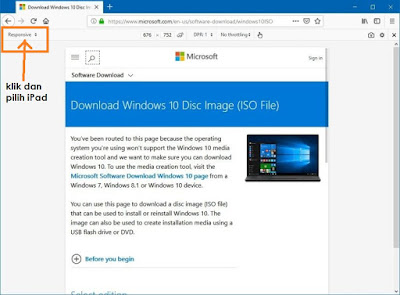
Cara download Installer windows 10 dalam format ISO

1. Jika anda bercadang untuk download windows 10 melalui website rasmi windows - pilihan untuk download dalam format ISO tidak di berikan.  ...