11/02/2010

BCS2234 Java Applet Lab Activities 3/11/2010

1. New power point slide for Java applet. Click here.

2. Exercise

Write an applet that writes your name using the drawString method. Embed a link to your applet in an HTML document and view it using a Web browser.

References / tutorials

1. visual and interactive aspects of applets

2. Complete references for

java.awt
Class Graphics


10/29/2010

Tugasan 3 BCS2234 OOP

Tugasan BCS2234 boleh di muat turun daripada pautan berikut.
Tarikh hantar 11/11/2010 (Khamis).

10/26/2010

Exception 27 /10 /2010

Write a program that creates an input dialog box to perform integer divisions, as shown in following figure. The user enters two numbers in the text fields, Number 1 and Number 2. The division of Number 1 and Number 2 is displayed in the Result field (Figure 1).


[FIGURE 1]


Add an exception to handle invalid input as shown in Figure 2.


[FIGURE 2]


10/19/2010

BCS2234 20/10/ 2010 Lab Activities on Inheritance

Design a class named Cube that extends GeometricObject. The class contains:

  • One double data field named length with default values 1.0 to denote all sides of the cube.

  • A no-arg constructor that creates a default cube.

  • A constructor that creates a cube with the specified length.
  • The accessor methods for all three data fields.
  • A method named getArea() that returns the area/volume of this cube.
area of cube =length*length*length

  • A method named getPerimeter() that returns the perimeter of this cube.
perimeter of cube = 12 * length
  • A method named toString() that returns a string description for the cube.

  • The toString() method is implemented as follows:

return "cube: length = " + length;


Draw the UML diagram that involves the classes Cube and GeometricObject. Implement the class. Write a test program that creates a Cube object with side 5, sets color yellow and filled true, and displays the area, perimeter, color, and whether filled or not.


BCS2234 Inheritance (2)


Pada Slide No 4 Chapter9 pelajar telah di beri contoh cara mengistharkan Superclasses dan subclasses. 4 class telah di istiharkan iaitu GeometricObject, Circle, Rectangle dan TestCircleRectangle (sila rujuk gambar di sebelah). Contoh tersebut menggunakan package (iaitu setiap satu class di di tulis dalam fail berasingan. Jika pelajar ingin mengumpulkan semua kelas dalam satu fail - Langkah yang perlu di buat ialah dengan membuang perkataan public pada setiap class yang dibina. Sila lihat contoh dibawah:-


/**
* @(#)Perwarisan.java
*
* Perwarisan application
*
* @author
* @version 1.00 2010/10/20
*/

public class Perwarisan {

public static void main(String[] args) {

// TODO, add your application code
System.out.println("Hello World!");
Circle circle = new Circle(1);
System.out.println("A circle " + circle.toString());
System.out.println(circle.getRadius());
System.out.println("The radius is " + circle.getRadius());
System.out.println("The area is " + circle.getArea());
System.out.println("The diameter is " + circle.getDiameter());

}
}


class GeometricObject { // perkataan public telah di buang
private String color = "white";
private boolean filled;
private java.util.Date dateCreated;

/** Construct a default geometric object */
public GeometricObject() {
dateCreated = new java.util.Date();
}

/** Return color */
public String getColor() {
return color;
}

/** Set a new color */
public void setColor(String color) {
this.color = color;
}

/** Return filled. Since filled is boolean,
so, the get method name is isFilled */
public boolean isFilled() {
return filled;
}

/** Set a new filled */
public void setFilled(boolean filled) {
this.filled = filled;
}

/** Get dateCreated */
public java.util.Date getDateCreated() {
return dateCreated;
}

/** Return a string representation of this object */
public String toString() {
return "created on " + dateCreated + "\ncolor: " + color +
" and filled: " + filled;
}
}

class Circle extends GeometricObject { // perkataan public telah di buang
private double radius;

public Circle() {
}

public Circle(double radius) {
this.radius = radius;
}

/** Return radius */
public double getRadius() {
return radius;
}

/** Set a new radius */
public void setRadius(double radius) {
this.radius = radius;
}

/** Return area */
public double getArea() {
return radius * radius * Math.PI;
}

/** Return diameter */
public double getDiameter() {
return 2 * radius;
}

/** Return perimeter */
public double getPerimeter() {
return 2 * radius * Math.PI;
}

/** Print the circle info */
public void printCircle() {
System.out.println("The circle is created " + getDateCreated() +
" and the radius is " + radius);
}
}

10/13/2010

BCS2234 13/10/ 2010 Inheritance

Programming Exercises

Sections 9.2–9.4

9.1 (The Triangle class) Design a class named Triangle that extends GeometricObject. The class contains:
  • Three double data fields named side1, side2, and side3 with default values 1.0 to denote three sides of the triangle.

  • A no-arg constructor that creates a default triangle.

  • A constructor that creates a rectangle with the specified side1, side2, and side3.

  • The accessor methods for all three data fields.

  • A method named getArea() that returns the area of this triangle.

  • A method named getPerimeter() that returns the perimeter of this triangle.

  • A method named toString() that returns a string description for the triangle.

For the formula to compute the area of a triangle, see Exercise 5.19. The toString() method is implemented as follows:

return "Triangle: side1 = " + side1 + " side2 = " + side2 +   " side3 = " + side3; 

Draw the UML diagram that involves the classes Triangle and GeometricObject. Implement the class. Write a test program that creates a Triangle object with sides 1, 1.5, 1, sets color yellow and filled true, and displays the area, perimeter, color, and whether filled or not.


Running a Java Program from Command Prompt

  • Create a temporary folder C:\mywork. Using Notepad or another text editor, create a small Java file HelloWorld.java with the following text:
    public class HelloWorld {   public static void main(String[] args)   {     System.out.println("Hello, World!");   } }

    Save your file as HelloWorld.java in C:\mywork. To make sure your file name is HeloWorld.java, (not HelloWorld.java.txt), first choose "Save as file type:" All files, then type in the file name HelloWorld.java.

  • Run Command Prompt (found under All Programs/Accessories in the Start menu). Type
    C:\> cd \mywork
    This makes C:\mywork the current directory.
    C:\mywork> dir
    This displays the directory contents. You should see HelloWorld.java among the files.
    C:\mywork> set path=%path%;C:\Program Files\Java\jdk1.6.0_21\bin
    This tells the system where to find JDK programs.
    C:\mywork> javac HelloWorld.java
    This runs javac.exe, the compiler. You should see nothing but the next system prompt...
    C:\mywork> dir
    javac has created the HelloWorld.class file. You should see HelloWorld.java and HelloWorld.class among the files.
    C:\mywork> java HelloWorld
    This runs the Java interpreter. You should see the program output:
    Hello, World!

    If the system cannot find javac, check the set path command. If javac runs but you get errors, check your Java text. If the program compiles but you get an exception, check the spelling and capitalization in the file name and the class name and the java HelloWorld command. Java is case-sensitive!

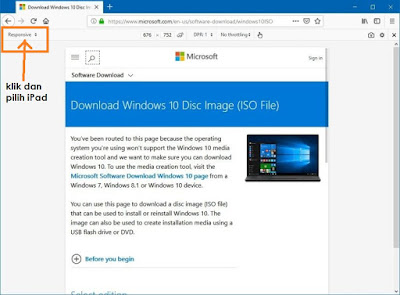
Cara download Installer windows 10 dalam format ISO

1. Jika anda bercadang untuk download windows 10 melalui website rasmi windows - pilihan untuk download dalam format ISO tidak di berikan.  ...